


Suno - AI Music & Songs Maker
4.837.03K Reviews
App Specs
- Version
- 1.94.0
- Updated On
- License
- Free
- Downloads
- 10,000,000+
- Developer
- Suno, Inc
- Categories
- Music & Audio
- Platform
- Android, iOS
Screenshots
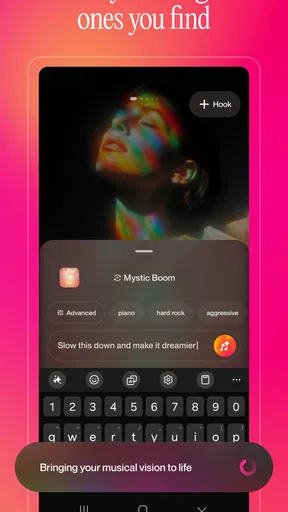
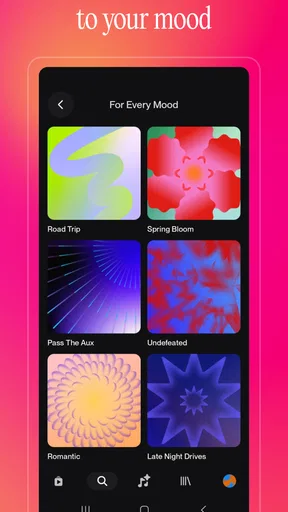
 Analysis by AppCompare
Suno - AI Music & Songs is most interesting when you treat it as a fast way to turn an idea into a song, not as a substitute for learning an instrument or producing a carefully finished track. I like that it lowers the barrier to experimenting: you can begin with a mood or a rough concept instead of needing a melody, recording setup, or music theory background. The trade-off is that quick generation gives you less direct control than building a song yourself, so the results are best approached as creative starting points rather than guaranteed keepers.
From a passing idea to something you can hear
That immediacy changes how I would use an AI music app. Instead of opening a traditional audio workstation and facing a blank timeline, I can start with a simple premise: a light song for a family slideshow, a dramatic sound for a tabletop game night, or a playful tune about an ordinary household mishap. The useful part is not just getting audio quickly; it is being able to test whether the idea has a musical shape at all.
For a practical workflow, I would make the request specific about feeling and purpose, then listen for what the result gets right before revising the concept. If the mood works but the song feels too busy, simplify the brief rather than piling on unrelated instructions. If the subject is clear but the sound is wrong, change the style language while keeping the central idea. Treating each attempt as a small experiment makes the process more manageable than expecting a perfect song on the first try.
That approach is especially handy for people who write, teach, make videos, or simply enjoy inventing things. A teacher might want a memorable classroom singalong; a writer could use a generated track to help set the tone while drafting; someone editing a personal montage may want a song that feels more tailored than a generic playlist selection. In each case, I would regard the output as a creative aid and check that it fits the context before sharing it publicly.
Getting to Know Suno
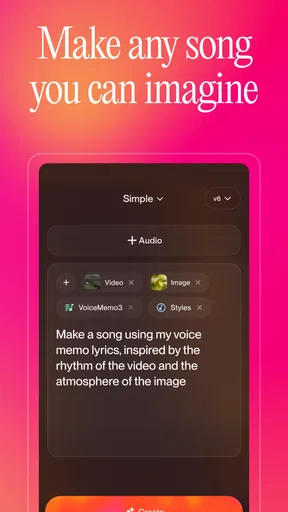
So, what’s the deal with Suno - AI Music & Songs? Imagine having a personal DJ who knows exactly what tunes you vibe to, no matter the mood or occasion. This app uses AI to help you create personalized music tracks, and it’s surprisingly intuitive. I mean, who wouldn’t want their own custom beats?
Features That Hit the Right Note
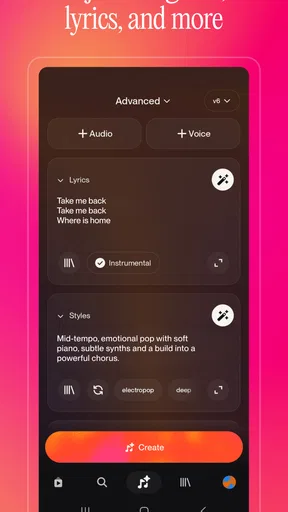
Let’s talk about the app’s features. First off, the AI-driven music creation tool is the star of the show. You can mix genres, adjust tempos, and even add special effects. It’s like having a mini recording studio right in your pocket. And if you’re someone who loves to experiment, you’ll definitely appreciate the variety of options available.
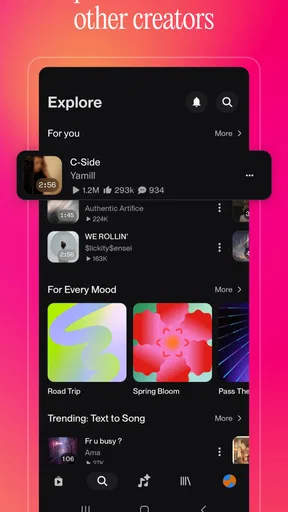
Another thing that stands out is the user interface. It’s sleek, modern, and super easy to navigate. Whether you’re a tech guru or someone who barely knows how to use their phone, you’ll find it straightforward to create and save your tracks. Plus, the app’s got this nifty feature where it learns your preferences over time, so your music suggestions just keep getting better.
Worth Reading Before You Choose

Flipboard Shows What News Apps Must Do Beyond the Feed

Switching to Android Auto Means Rethinking Your Driving Routine

Google Calendar Makes a Crowded Week Easier to Manage

Ludo King Makes the Most of the Minutes Between Plans

Baby Panda World Brings Quick Play to Modern Phones, but Its Game Library Feels Busy

ESPN’s Live Game View Makes Following Close Games Easier
Where its creative shortcut has limits
The same convenience can make the result feel less personal than a song shaped note by note. In a conventional music-making app, you can place sounds, edit parts, and refine the arrangement directly; here, the appeal is letting the system do much of that work. That makes Suno easier to approach, but it also means a specific musical detail may not land exactly as you pictured it. I would not choose it when I need precise control over every instrument or a dependable final mix for a professional project.
There is also a difference between generating a track and deciding what to do with it. A song that sounds entertaining in the moment may not suit a video, presentation, or public post once you consider its tone and intended audience. I’d listen through the full result before sharing, and avoid treating an AI-made draft as automatically ready for every setting. For a personal joke or a creative experiment, that uncertainty is part of the fun; for a tightly specified commission, it can become friction.
One useful habit is to keep the brief focused and make changes in stages. Start with the core subject and mood, then refine the musical direction after hearing what the first attempt emphasizes. This helps you understand which parts of your instructions are influencing the result instead of changing several things at once and losing track of what worked. It also gives you a better basis for deciding whether to keep exploring or move on to another tool.
Why You Might Want to Hit Download
Now, why should you give Suno a shot? If you’re into music even a little bit, this app is a game-changer. It’s perfect for those long commutes, chill evenings, or even when you’re hosting a party and want to impress your friends with some custom tunes. It’s like having a creative outlet that’s always ready when you are.
A realistic everyday use might be making a small birthday surprise: I could turn an inside joke into a song, listen to a few versions, and send the one that best captures the mood. That is a more natural fit than trying to produce a polished track from scratch, because the personal idea is the point. For a commute, I’d use it to explore a theme or make something amusing, but I would not assume that a generated song will replace the carefully chosen music I already know I want to hear.
Compared with a streaming music service, Suno is for making something new rather than browsing a deep library of released songs. Compared with a conventional audio editor, it asks for less hands-on arrangement but gives you less exact control. That distinction matters: choose Suno when the spark of an idea matters more than fine editing; choose a library when you want a known song, or an editor when you need to shape every detail yourself.
It is a better fit for curious listeners, casual creators, and people who enjoy trying variations without needing formal music skills. I would be more cautious about recommending it to someone who wants an instrument tutor, a conventional recording studio, or a guaranteed match to a precise musical reference. It can make starting feel easy, but it does not remove the need to judge whether the result is actually good for your purpose.
And let’s not forget the social aspect. You can share your creations with friends or on social media, and let’s be honest, who doesn’t like a bit of social media love on their latest masterpiece? It adds a fun, social dimension to the music-making process.
Who should give it a try
Suno is a music and audio app from Suno, Inc. It is free to install, with in-app purchases ranging from four dollars to two hundred eighty-nine dollars and ninety-nine cents per item, so I would check the purchase details before committing to anything. Its Teen age rating is also worth keeping in mind if you are choosing an app for a younger user. The app has a 4.8 average from around 976,000 ratings and more than 10 million installs, a strong sign that many people are giving this style of music creation a try, though popularity alone cannot tell you whether its approach suits your taste.
The release date is December 3, 2024, and the current version is 1.41.0. It requires Android 8.0 or later. Those details make it easier to judge whether it fits your device, but the more important question is what you want from music-making: if you enjoy playful experiments and can accept imperfect results, the low-friction approach is appealing. If you need detailed arrangement tools, prefer listening to finished recordings, or dislike unpredictable creative outputs, another kind of music app will likely serve you better.
Final Thoughts
Overall, Suno - AI Music & Songs is a must-try for anyone looking to explore their musical side. It’s user-friendly, packed with features, and most importantly, makes creating music fun and accessible. So why not give it a whirl? You might just find your new favorite hobby.
Ready to dive into the world of AI music creation? You can find the download link right on our site. Trust me, once you start, you won’t want to stop!
Pros
- Easy-to-use interface for creating music.
- Wide variety of genres to explore.
- High-quality sound output.
- Regular updates with new features.
- Supports collaborative projects.
Cons
- Limited offline functionality.
- Some features require in-app purchases.
- Occasional lag in older devices.
- Requires constant internet connection.
- Limited export options for free users.
FAQs for Suno - AI Music & Songs Maker
What is Suno - AI Music & Songs?
Suno - AI Music & Songs is an innovative app that uses artificial intelligence to create personalized music and playlists. It analyzes your listening habits and preferences to generate unique soundtracks tailored to your taste. The app is designed for music lovers seeking a personalized auditory experience.
How does Suno utilize AI to enhance music creation?
Suno employs advanced AI algorithms to analyze your listening history, mood, and preferences. It then generates custom playlists and music tracks that align with your unique taste. The AI continuously learns and adapts, ensuring the music recommendations evolve alongside your changing preferences.
Is an internet connection required to use Suno?
Yes, Suno requires an internet connection to access its full range of features, including streaming music and real-time AI recommendations. However, some offline capabilities, like playing previously downloaded tracks, may be available, allowing you to enjoy music without a constant connection.
What platforms is Suno available on?
Suno - AI Music & Songs is available for both Android and iOS devices. You can download it from the Google Play Store or Apple App Store. The app is designed to provide a seamless user experience across multiple devices, ensuring you can enjoy your personalized music everywhere.
Are there any subscription fees for using Suno?
Suno offers a free version with basic features, but to unlock its full potential, a subscription is required. The premium version provides enhanced AI capabilities, ad-free listening, and exclusive content. Pricing details can be found within the app or on the official website, ensuring you have the best experience possible.


